1.Best for most setups
Straight gaming desk (55 in or wider)
Enough width for a monitor, speakers and a full mouse pad, with a carbon-fibre-style or laminate top that wipes clean. Look for a steel frame with adjustable feet.


The best gaming desk is sized for your screens first. Width decides whether two monitors or an ultrawide fit side by side; depth decides whether a 27-inch or larger screen sits far enough from your eyes, with room left for a keyboard and a low-sensitivity mouse swipe.
After size, choose the shape (straight, L-shaped corner or standing), then add a monitor arm and cable management, which do more for a setup than any RGB strip.
As an Amazon Associate, Justlikegames earns from qualifying purchases. Links below go to Amazon.
Enough width for a monitor, speakers and a full mouse pad, with a carbon-fibre-style or laminate top that wipes clean. Look for a steel frame with adjustable feet.
Puts a second workspace at right angles — one side for gaming, the other for a laptop, stream deck or a console. Uses a corner that is otherwise wasted.


Change position through a long session. Dual motors lift heavier setups more smoothly; check the height range and weight capacity against your monitors.

Frees desk space, puts the screen at the right height and distance, and makes a dual-monitor setup line up. Check VESA mounting and the weight rating.


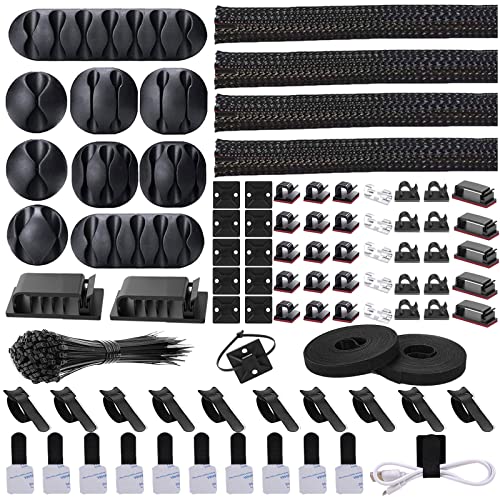
An under-desk tray holds the power strip and bricks so only one cable reaches the wall. Essential on a standing desk, where cables must move with it.


Covers the full width for keyboard and mouse, protects the top and quiets the desk.



Prices as of Oct 27, 2026, 4:34 AM UTC. Product prices and availability are accurate as of the date/time indicated and are subject to change. Any price and availability information displayed on Amazon.com at the time of purchase will apply to the purchase of this product.
Measure your monitors' widths (not the diagonal) and add room for speakers or a microphone arm.
| Setup | Min. width | Min. depth | Notes |
|---|---|---|---|
| One 24–27 in monitor | 40 in | 24 in | Wider if you use a low mouse sensitivity |
| One 32 in or 34 in ultrawide | 48 in | 28 in | Deeper desk or a monitor arm for eye distance |
| Two 27 in monitors | 55 in | 28 in | A dual monitor arm saves depth |
| Monitor plus laptop or streaming gear | L-shaped | 24 in each side | Keep the main screen straight ahead |
The details that separate a desk you keep for years from one that wobbles.
Sit with elbows at about 90 degrees and wrists flat; the top of the monitor at or slightly below eye level; the screen roughly an arm's length away. A monitor arm and an adjustable chair do most of the work — see our gaming chair guide for the other half of the setup.

VASAGLE Standing Desk, 55x28 Inch Electric Adjustable Desk, 30-Min Assembly | Home Office Computer Desk, Gaming Desk with Sedentary Reminder and 4 Memory, Sit Stand Desk for Study, Writing ULSD315BZ02SV1
$105.52
Check price on Amazon
OffiGo Farmhouse 68 Inch L Shaped Executive Desk with Drawers, Walnut+White | Corner Table with Monitor Stand, Office Desk with Printer Shelf, File Cabinet, Outlets, Home Office Computer Workstation
$269.99
Check price on Amazon
Huuger 47 X 24 Inch Electric Standing Desk with Power Outlets and USB-C Port, Height Adjustable Desk, Sit Stand Desk for Home Office, Computer & Gaming Desk with 3 Presets, Stable Steel Frame, Black
$94.98
Check price on Amazon
HUANUO FlowLift™ Pro Monitor Arm for 13–32" Screens, MechaSpring Monitor Mount, Fully-Adjustable Monitor Stand with Tilt/Swivel/Rotation, Tool-Free VESA Mount, C-Clamp/Grommet Base, Max Load 15.4 lbs
$29.99
Check price on Amazon
YECAYE Cable Management, 6 Pack, Black | Cord Organizer;Adhesive Mount;No-Drill Under Desk Wire Management;for Home Office;Baby proofing
$16.99
Check price on Amazon
Furmax Gaming Chair, Video Game Chair with Footrest and Massage Lumbar Support, Swivel Seat Height Adjustable Computer Chair with Headrest, Racing E-Sport Gamer Chair (White)
$78.99
Check price on AmazonAs an Amazon Associate we earn from qualifying purchases at no extra cost to you.
Prices as of Oct 27, 2026, 4:34 AM UTC. Product prices and availability are accurate as of the date/time indicated and are subject to change. Any price and availability information displayed on Amazon.com at the time of purchase will apply to the purchase of this product.
Shopping for someone? See our gift guide for gamers.
At least 40 in wide and 24 in deep for one 24–27 in monitor; 55 in or more for two monitors; and 28 in or more of depth for large or ultrawide screens unless you use a monitor arm.
Yes, if you have a corner and run a second screen, a laptop or streaming gear. Keep your main monitor straight ahead of you rather than in the corner.
They are good for long sessions because you can change position. Choose dual motors, a stable frame at full height and enough weight capacity for your monitors.
Not strictly, but it frees desk space, sets height and distance precisely and makes dual monitors easy to align.
Free brain games for memory, logic, math and focus, from the makers of this game finder. Plays offline.
Free · iPhone & Android · no account